On this page
If you prospect on LinkedIn every week, buy Sales Navigator Core. If you mostly want a stronger profile, a few InMails and a look at who viewed you, Premium Business is enough and costs a lot less.
Premium Business costs $69.99 a month. It gives you 15 InMail credits, a few extra search filters and a full year of profile viewers. Sales Navigator Core costs $119.99 a month. It adds 50+ search filters, saved lead and account lists, alerts about those people and 50 InMail credits. Sales Navigator also includes the Premium Business features, so you never need both.
Prices are LinkedIn's US list prices, checked on November 7, 2026.
Sales Navigator vs Premium at a glance
| Premium Business | Premium All-in-One | Sales Navigator Core | |
|---|---|---|---|
| Price, billed monthly | $69.99/month | $89.99/month | $119.99/month |
| Price, billed yearly | $539.88/year ($44.99/month) | $899.88/year ($74.99/month) | $1,079.88/year ($89.99/month) |
| InMail credits | 15 a month | 30 a month | 50 a month |
| Search filters | Limited | Limited | 50+ filters |
| Saved lists | No | Saved leads | Lead and account lists, 10,000 of each |
| Alerts on people you follow | No | Basic post activity and tips | Job changes, new posts and account activity |
| AI research and writing help | No | Basic insights and message editor | Account IQ, Lead IQ and Message Assist |
| Who viewed your profile | Last 365 days | Last 365 days | Last 365 days |
| Built for | Your profile and network | Small business owners | Finding and following prospects |
Sales Navigator Advanced costs $159.99 a month, or $1,799.88 a year. It adds team features, which we cover below.
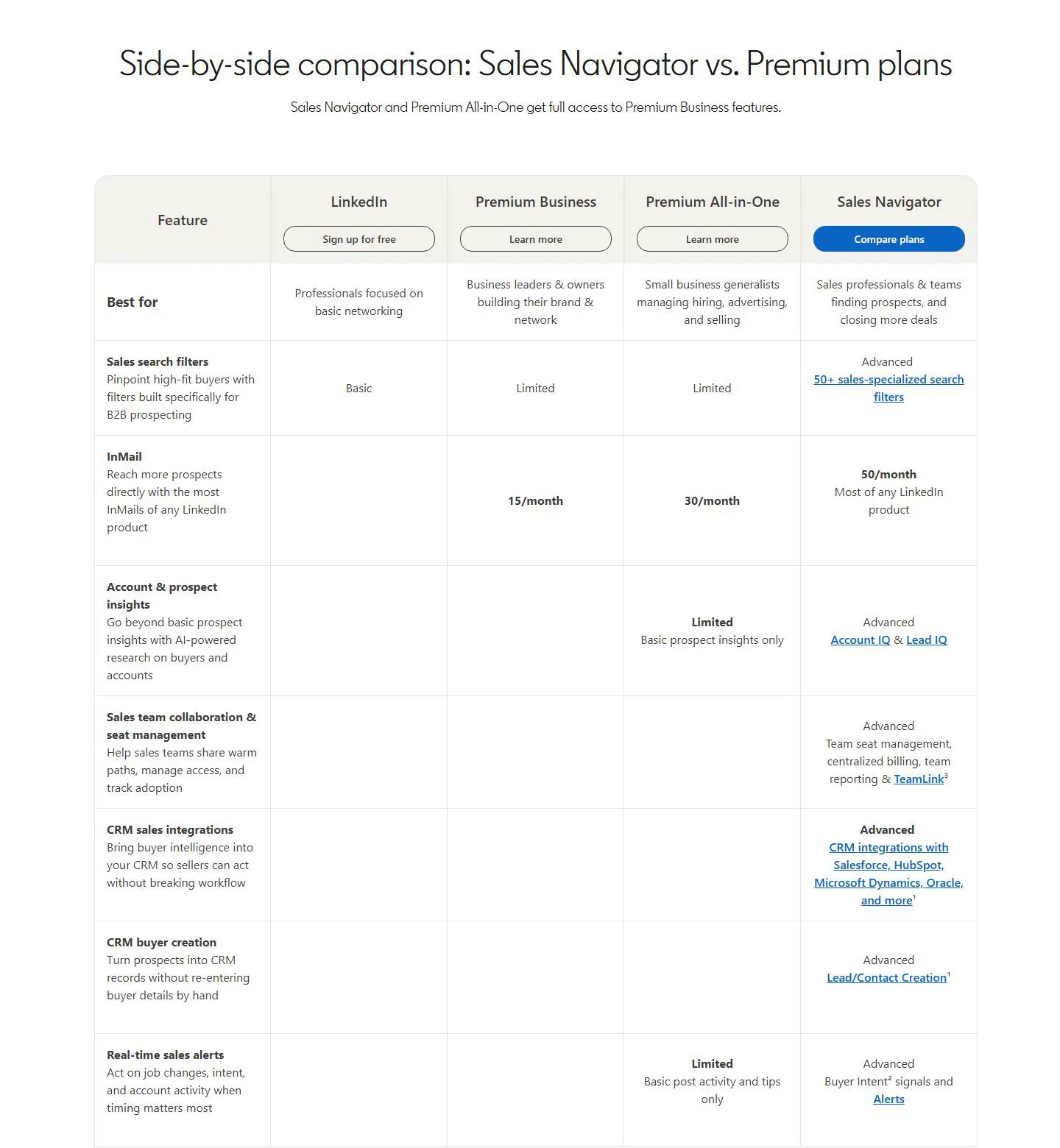
LinkedIn's own comparison page puts the plans next to each other. Premium plans have "Limited" search, while Sales Navigator has the filters, lists and alerts.
What Premium Business gives you
Premium Business is an upgrade to your normal LinkedIn account. You keep the same interface and get a few extra tools on top.
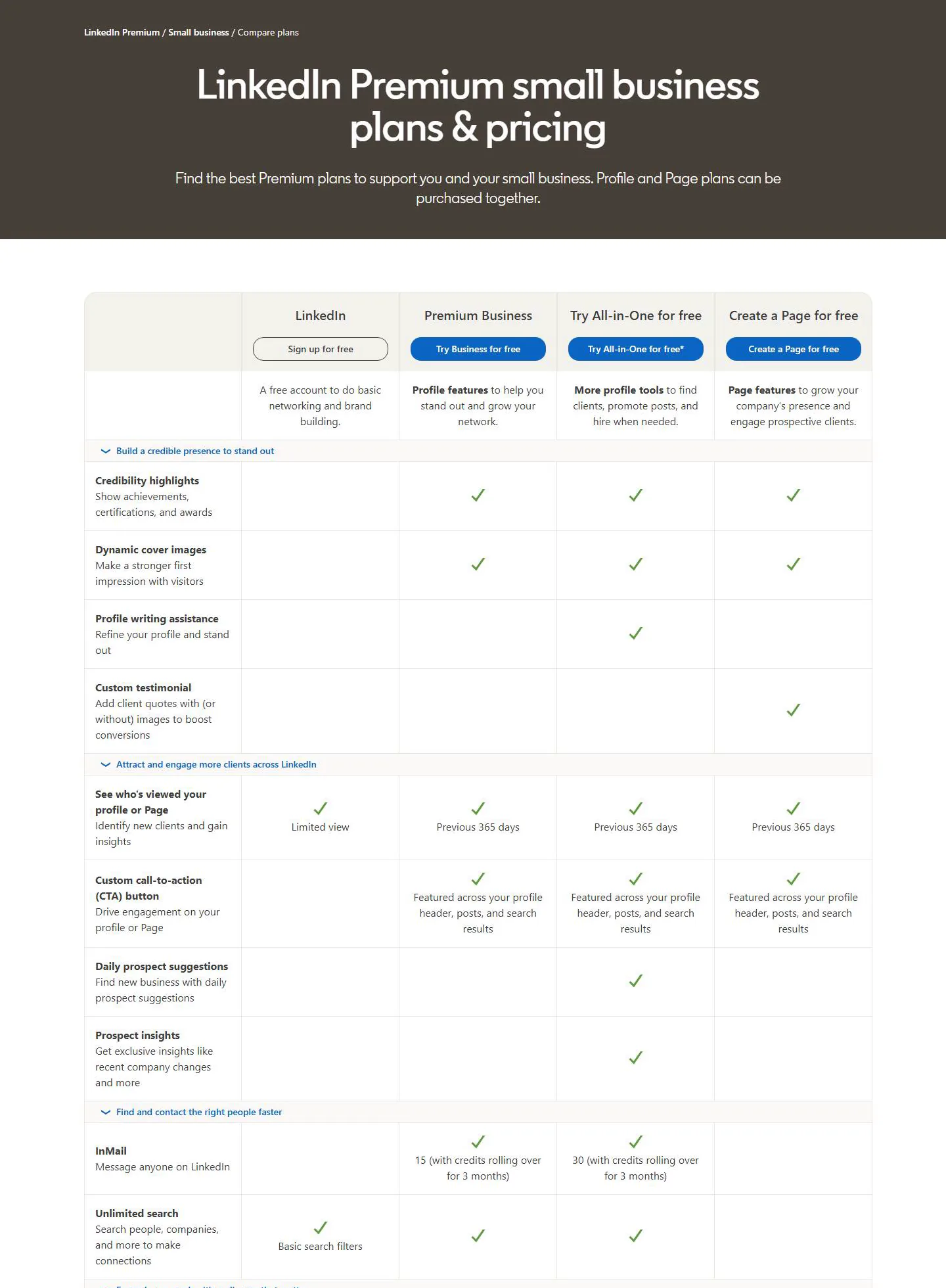
- 15 InMail credits a month. You can message people you aren't connected to. Unused credits roll over up to 45.
- Who viewed your profile for the last 365 days. Free accounts only see a short, limited list.
- A higher search limit. Free accounts can run out of profile searches each month. Premium Business raises that limit, which is what LinkedIn means by "unlimited search" on its plans page.
- A few more search filters. The filters stay basic. LinkedIn calls them "Limited" next to Sales Navigator's 50+ filters.
- LinkedIn Learning courses.
That fits a founder or consultant who sells mostly through their network and their posts. You see who is checking you out, and you can write to a few new people each month. It's thin for daily prospecting, though. There are no saved lists or alerts, so you keep track of prospects somewhere else.
What about Premium All-in-One?
All-in-One is a newer plan for small business owners. It costs $89.99 a month or $899.88 a year. On top of Premium Business, you get 30 InMail credits, up to 15 prospect suggestions a day and basic prospect insights. It also includes $50 a month to boost posts and $50 a month for job posts.
LinkedIn is still rolling it out to some users, so you may not see it yet. Pick it if you will use the boost and hiring credits. If you won't, skip it. Premium Business is $20 cheaper, and Sales Navigator Core is only $30 more.
What Sales Navigator adds
Sales Navigator is a separate app inside LinkedIn. It has its own search and lists, built for finding buyers and keeping track of them.
- 50+ search filters. Find people and companies by much more specific criteria than normal search allows.
- Lead and account lists. Save up to 10,000 people and 10,000 companies, and sort them into lists.
- Alerts. See when saved leads change jobs or post something new, and when there's activity at saved accounts.
- Account IQ and Lead IQ. AI summaries of a company or a person, so you can prepare faster.
- Message Assist. AI help with drafting messages.
- Relationship Explorer and Relationship Map. Find the right people at an account and see who you are missing.
- 50 InMail credits a month.
The higher tiers are for teams. Advanced adds TeamLink, which shows when a colleague knows someone you want to reach. It also adds shared lists, Buyer Intent (which accounts show interest in your company), trackable links for the content you share, team reporting and one bill for all seats. Advanced Plus adds CRM sync with Salesforce, HubSpot, Microsoft Dynamics and Oracle. Its price is quoted by LinkedIn's sales team.
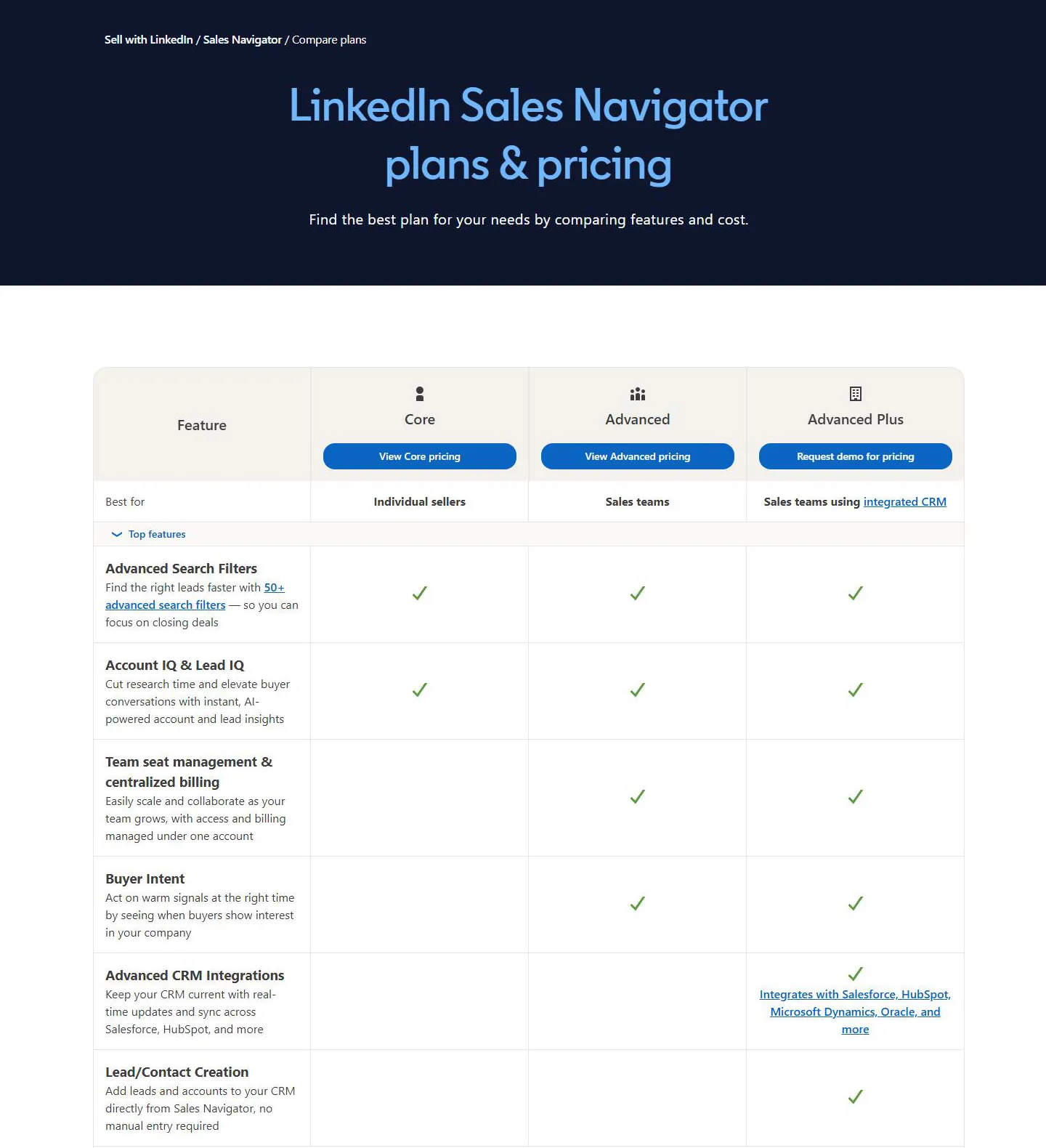
How much more Sales Navigator costs
On monthly billing, Sales Navigator Core costs $50 a month more than Premium Business. On yearly billing, Core costs $1,079.88 and Premium Business costs $539.88. That's about double, or $540 more a year.
Yearly billing saves money on both. Premium Business drops from $839.88 to $539.88 a year. Core drops from $1,439.88 to $1,079.88 a year.
| Plan | 12 months billed monthly | Billed yearly | You save |
|---|---|---|---|
| Premium Business | $839.88 | $539.88 | $300 |
| Premium All-in-One | $1,079.88 | $899.88 | $180 |
| Sales Navigator Core | $1,439.88 | $1,079.88 | $360 |
| Sales Navigator Advanced | $1,919.88 | $1,799.88 | $120 |
Sales Navigator Core and Advanced offer one free month. You need a card, and you only qualify if you have no paid LinkedIn plan and haven't had a LinkedIn trial in the past year. LinkedIn emails you seven days before the trial ends. Premium may offer a free month too.
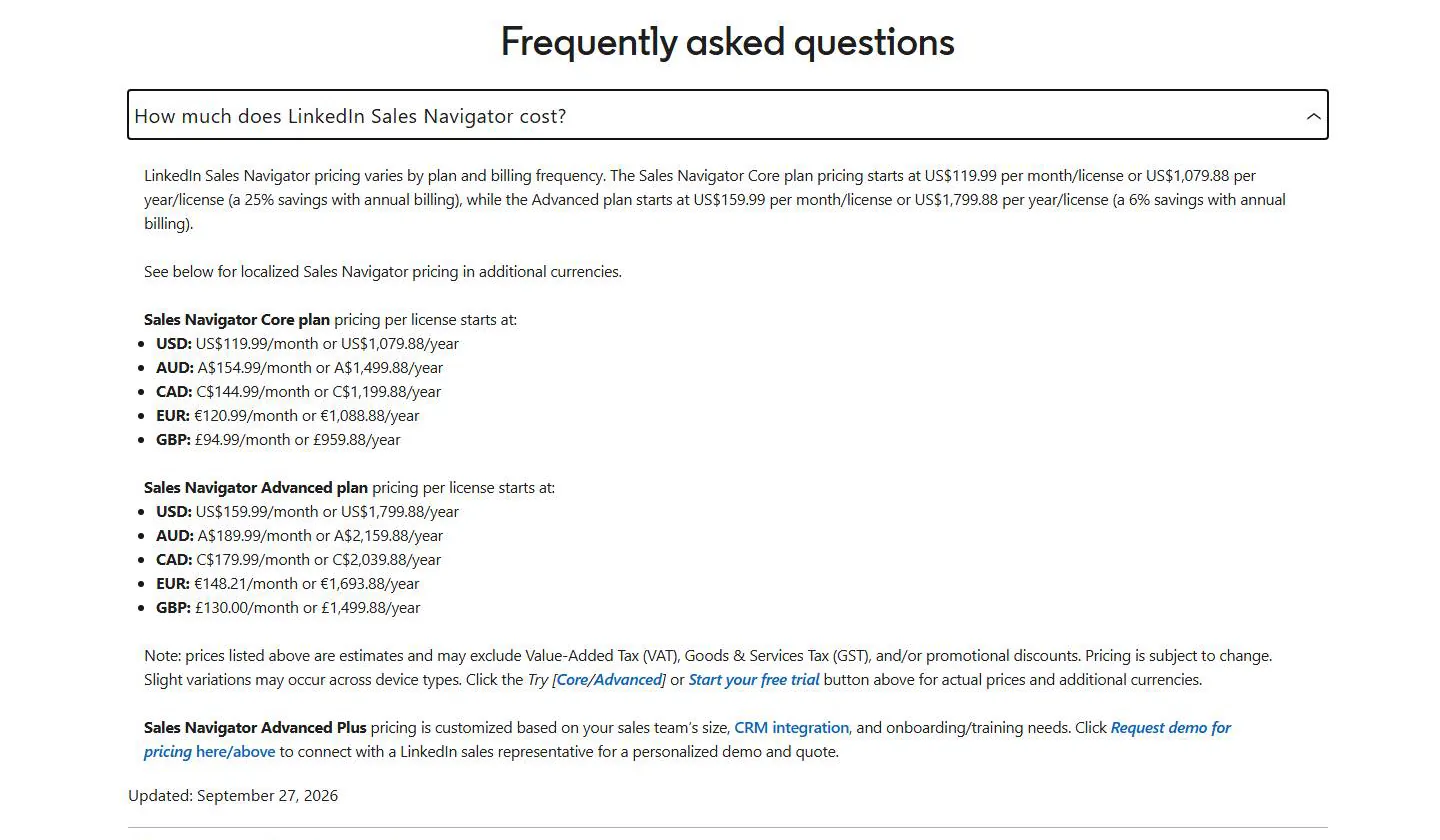
If you pay in another currency, Sales Navigator Core is €120.99 or £94.99 a month on monthly billing.
How InMail credits work on each plan
| Plan | Credits a month | Most you can bank |
|---|---|---|
| Premium Career | 5 | 15 |
| Premium Business | 15 | 45 |
| Premium All-in-One | 30 | 90 |
| Sales Navigator (all tiers) | 50 | 150 |
Fifty credits is about two InMails per working day. Fifteen is less than one. If InMail is a big part of how you reach new people, that difference alone may decide the plan.
A few rules matter when you switch:
- Premium credits don't move to Sales Navigator. You can't use them there, and they don't transfer when you upgrade. Use them before you switch.
- Credits disappear when you cancel. Your plan runs until the end of the month or year you paid for, then your balance drops to zero.
- You get a credit back when someone replies. The reply has to come within 90 days.
- New Sales Navigator credits arrive on the 1st of each month, whatever your billing date. Unused credits expire after 90 days, and you can't buy extra ones.
Do you need Premium if you have Sales Navigator?
No. LinkedIn says a Sales Navigator subscription includes the Premium Business features. You still see who viewed your profile for 365 days, you still get LinkedIn Learning, and you still get the higher search limit.
Both plans are tied to your LinkedIn profile. LinkedIn says you may need to cancel your current plan before you switch to another. If you move from Sales Navigator back to Premium, you lose the Sales Navigator features, including your lists, alerts and saved searches.
Which plan should you pick?
- Premium Business if you sell mostly to people who already know you, post often, and send fewer than 15 InMails a month.
- Premium All-in-One if you run a small business and will use the prospect suggestions plus the boost and hiring credits.
- Sales Navigator Core if you prospect every week, want saved lists and alerts on the people you follow, and need more InMail.
- Sales Navigator Advanced if a sales team needs shared lists, TeamLink and one place to manage seats and billing.
Premium Career ($39.99 a month) is built for job seekers. It has 5 InMail credits a month and no sales tools, so start with Premium Business if you're buying for sales.
Where Extrovert fits
Both plans help you find people. Extrovert helps with what comes next: staying in touch with them over weeks.
Extrovert tracks your prospects' posts and drafts comments and DMs in your voice. You can review each draft, or let first DMs and follow-ups go out automatically within your daily limits. When someone replies, the conversation comes back to you.
It works with Sales Navigator Core or Advanced, or without Sales Navigator. You can import people from Sales Navigator searches and saved lists, paste a LinkedIn search URL, or find them with Extrovert's own Lead Finder. It doesn't send InMail. Extrovert costs $49 per seat a month, with a 10-day free trial and no card needed.
See how the two work together in Extrovert vs LinkedIn Sales Navigator. If Sales Navigator isn't the right fit, our list of Sales Navigator alternatives covers other options.
FAQ
What is the difference between Premium All-in-One and Sales Navigator Core?
All-in-One is for small business owners. It has 30 InMail credits, daily prospect suggestions, basic insights and monthly credits for boosting posts and hiring. Sales Navigator Core is for prospecting, with 50+ filters, lead and account lists, alerts and 50 InMail credits. Core costs $30 a month more on monthly billing.
Is Sales Navigator worth it over Premium?
It's worth it if you look for new prospects every week. The lists and alerts save you from tracking people in a spreadsheet, and you get more than three times the InMail credits. If you send a handful of InMails a month, Premium Business does the job.
How much is one year of LinkedIn Premium?
Premium Business costs $539.88 a year, which works out to $44.99 a month. Premium Career costs $239.88 a year, and All-in-One costs $899.88.