On this page
Extrovert and LinkedIn Sales Navigator both help you find prospects. What you need after discovery determines the fit: native LinkedIn research and InMail, or a daily campaign that prepares comments, connection requests and DM follow-ups.
Extrovert connects discovery to ongoing engagement for founders, account executives and sales teams. Sales Navigator provides native LinkedIn search, saved-lead alerts, relationship mapping and InMail. Extrovert uses a separate B2B database and activity-based discovery, then organizes the people you select into an engagement routine.
Which workflow are you paying for?
- You have a list, but rarely stay in touch. Extrovert prepares a prioritized feed, comment drafts in your voice and relevant follow-ups for the people already on your list.
- You need native LinkedIn search or outreach before a connection. Sales Navigator supplies LinkedIn member and account search and 50 monthly InMail credits per license. Extrovert's discovery and ordinary DMs do not replace those capabilities.
- Your team needs introduction paths or CRM-embedded insights. TeamLink is available on Sales Navigator Advanced and Advanced Plus; advanced CRM integrations and lead/contact creation require Advanced Plus. Extrovert's shared campaigns and imports serve a different team workflow.
- You need both research and consistent engagement. Import your Sales Navigator list into Extrovert. Keep the two subscriptions only when you use the research features and the engagement campaign, rather than paying twice to store the same people.
Extrovert starts at $49 per connected LinkedIn account per month. Sales Navigator Core starts at US$119.99 per license per month. Compare their included usage below before treating the lower price as a feature-for-feature replacement.
Extrovert vs Sales Navigator by sales job
Sales Navigator also supports engagement: its alerts can inform follow-ups, TeamLink exposes introduction paths on eligible plans, and Message Assist drafts outreach. The difference is how those capabilities connect to your daily work.
On mobile, swipe the comparison table sideways to read both products.
| Sales job | Extrovert | Sales Navigator |
|---|---|---|
| Find relevant people | B2B database search and LinkedIn activity discovery | Native LinkedIn lead and account search with 50+ filters |
| Decide whom to engage today | Campaign feeds with prioritized posts and comment drafts | Saved-lead and account alerts, including job changes and new content |
| Write with context | Comment and DM drafts using your Voice, instructions and conversation context | Message Assist for personalized outreach; availability varies by account and language |
| Reach people outside your network | Connection requests, then ordinary DMs after acceptance; no InMail bundle | 50 InMail credits per license each month on all three plans |
| Reopen a conversation | Post-based Conversation Restarters and suggested follow-ups | Lead and account alerts that can inform your next message |
| Coordinate a team | Shared campaigns, lists and teammate review | Advanced and Advanced Plus add TeamLink, Smart Links and team management |
| Connect CRM work | CRM imports, API, webhooks and MCP | Advanced Plus adds advanced CRM integrations, lead/contact creation and embedded experiences |
Sales Navigator's Buyer Intent, available on Advanced and Advanced Plus, surfaces interest in your company. Extrovert's Intent Signals discovers people through configured activity. These features answer different questions; neither makes every social interaction a buying signal.
Sales Navigator also offers AI lead and account research. Its Message Assist supports outreach to researched leads; Extrovert drafts comments and DMs using your Voice, instructions and conversation context across an ongoing campaign.
From discovery to ongoing relationships
A prospect list gives you people to research. Staying in touch requires another set of decisions: whose post deserves attention, what you can contribute and when a message would be relevant.
Extrovert brings those decisions into one workspace. You can find people through Lead Finder or Intent Signals, import a Sales Navigator list, or add prospects from your CRM or CSV. Then you organize them into campaigns, review prioritized posts and use comment and DM drafts that follow your Voice and instructions. The Extrovert product workflow connects each step.
Find people by fit with Lead Finder
Lead Finder searches a separate B2B database by job title, seniority, location, company size, industry and technologies, among other criteria. It does not use your LinkedIn account to run the search. You can search and preview matches before connecting LinkedIn. The preview shows roles, companies and locations; full names and LinkedIn URLs appear after you add people to a campaign. Use the free preview to check how well your target segment is covered before spending Credits.
This is a different search source from Sales Navigator's native LinkedIn member and account search. Extrovert does not reproduce LinkedIn's relationship graph, TeamLink or InMail allowance.
Find people through activity with Intent Signals
Intent Signals finds people behind relevant LinkedIn activity, such as engagement with a chosen post, topic or competitor. It shows the activity that surfaced each person, so you have context for deciding whether to add them to a campaign.
The illustration shows three discovery signals: a topic comment, engagement with a competitor's post and a connection with a competitor's sales team. These are reasons to investigate, not proof of a purchase decision.
Illustration: a radar sweeping LinkedIn activity. Most of it is passed over; three people are found by what they did: commented on a post about your topic; engaged with a competitor's post; connected with a competitor's sales team.


Prioritize the comments worth writing
After discovery, Extrovert ranks posts from the people and topics in your campaigns. Choose a strategy that prioritizes the newest posts for visibility, people closest to outreach for warm outreach, or people you have not commented on recently for nurturing.
Sales Navigator alerts tell you what changed in a saved lead or account. Extrovert turns the posts in your campaign into a review queue with drafts, so you do not have to open every prospect's profile and start each comment from scratch.
Illustration: the posts a campaign found, sorted three ways. Newest posts, newest first: Just now, 20 min ago, 3 h ago, Yesterday. Closest to outreach, fewest comments left before outreach first: 1 left, 2 left, 3 left, 4 left. Evenly distribute, longest since your last comment first: 6 weeks ago, 3 weeks ago, Last week, Yesterday.
Newest posts
In a visibility campaign, the newest posts come first, so your comment goes up while people are still reading.
Closest to outreach
In a warm outreach campaign, the people who need only one or two more comments before you reach out come first, so you get to the first DM sooner.
Evenly distribute
In a nurturing campaign, the people you have not commented on for the longest come first, so nobody on the list is forgotten.


Follow up when a prospect gives you a reason
Conversation Restarters identify news in a prospect's posts and suggest a DM based on it. That gives account executives nurturing a deal a concrete starting point after a quiet period.
A launch or event in a prospect's post can give you a reason to reconnect. Sales Navigator's job-change and account alerts cover another reason to follow up: a changed role or account situation. Conversation Restarters use the content of posts; they do not replace a dedicated job-change alert.
Illustration: Extrovert reads the prospect's posts. hot take, thought leadership, motivation, promotion are skipped. One post, went to sf tech week, is a Restarter signal. Extrovert suggests the DM "Seen you went to SF Tech Week. How did it go?", and the prospect replies.

Pricing and included usage
Compare the seat or license price with the work and capacity it covers. The following are US-dollar entry prices.
| Product or plan | Billing basis and included usage |
|---|---|
| Extrovert | $49 per connected LinkedIn account/month, billed monthly, for one seat. Every feature, 250 tracked prospects, 1 topic and 300 monthly Credits per seat, pooled across the team. Annual billing offers two months free. |
| Sales Navigator Core | From US$119.99 per license/month, or US$1,079.88 per license/year. Native search, saved-lead alerts and 50 monthly InMail credits. |
| Sales Navigator Advanced | From US$159.99 per license/month, or US$1,799.88 per license/year. Adds team collaboration, TeamLink, Smart Links and Buyer Intent. |
| Sales Navigator Advanced Plus | Custom quote. Adds advanced CRM integrations, lead/contact creation and embedded experiences. |
Sales Navigator's annual prices are yearly charges, not monthly bills. Taxes, promotions, region and device can change the offer.
Extrovert teammates who do not connect a LinkedIn account are free. Discovery Credits and tracking capacity are separate: Lead Finder uses 1 Credit per processed prospect; Intent Signals uses 25–250 Credits per matching person, depending on the signal. Intent Signals results consume tracking capacity when you add them to a campaign. At 25 Credits per prospect, the 300 included Credits cover 12 people found through engagement with a chosen post. Signals priced at 250 Credits use most of that allowance for one person. Included Credits reset monthly; purchased top-ups roll over.
Extra capacity changes the budget: +250 tracked prospects costs $20/month or $200/year; +2 topics costs $15/month or $150/year. Credit top-ups cost $29 for 2,000 or $99 for 10,000 as one-time purchases. Volume discounts also affect the seat price. Use Extrovert pricing to configure the capacity your team needs.
For one account billed monthly, a $49 seat plus 250 extra tracked prospects costs $69/month and gives you 500 tracked prospects. The extra tracking capacity does not add discovery Credits. One Extrovert seat plus one Sales Navigator Core license starts at US$168.99/month before taxes and any Extrovert add-ons.
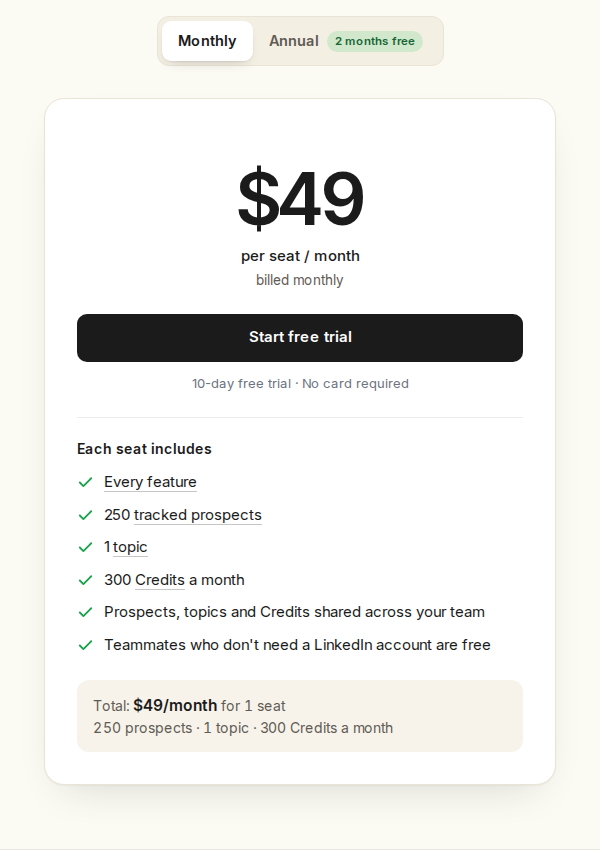
Extrovert's monthly plan includes every feature; tracking capacity and discovery Credits have separate limits.
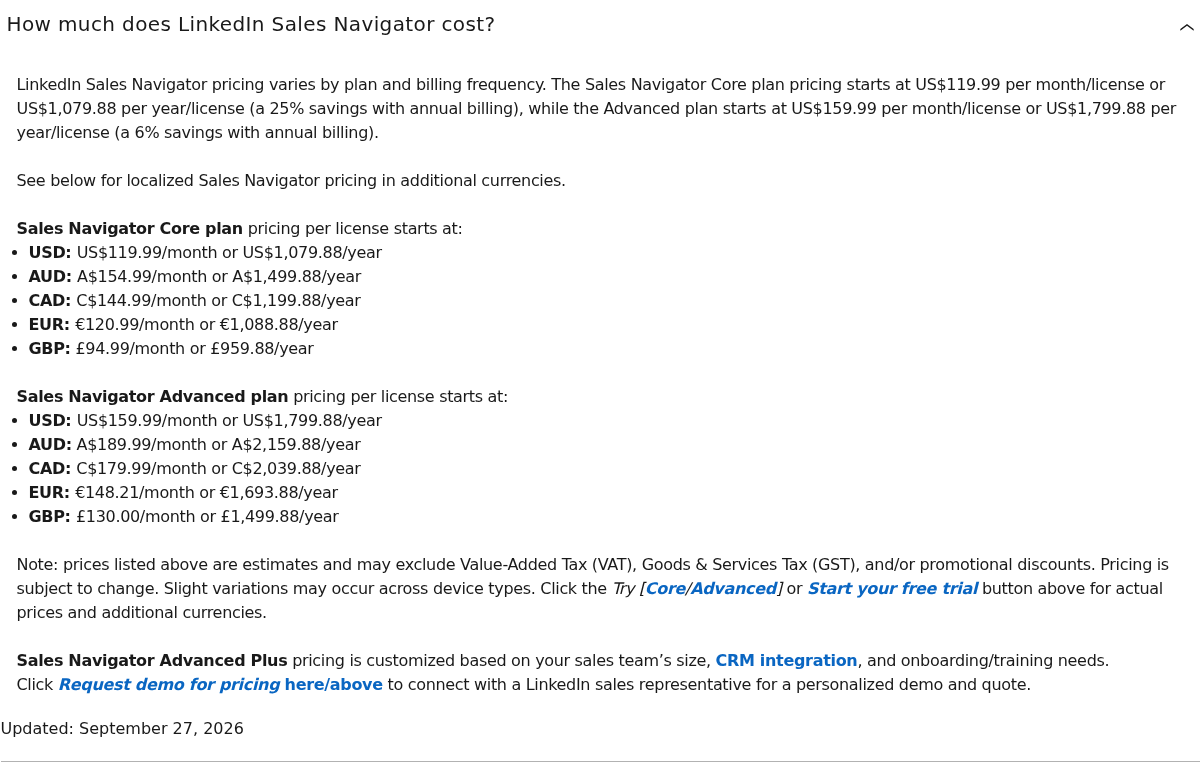
Sales Navigator lists monthly and yearly license prices separately. Advanced Plus is quote-based.
Trial terms and what to evaluate
Extrovert offers a 10-day trial with no card required. Test whether your target people have posts worth joining, whether the drafts sound like you and whether the campaign produces relevant follow-up opportunities. A discovery match alone does not tell you whether that person is active enough for your commenting routine.
Sales Navigator Core and Advanced trials require payment information. Eligibility is limited to members without a current paid LinkedIn subscription who have not used a LinkedIn trial in the previous 365 days. Monthly cancellation takes effect at the end of the paid month; annual cancellation takes effect at the end of the paid year.
Bring an existing Sales Navigator list into Extrovert
You do not have to rebuild your prospect list to start an engagement campaign. In Extrovert, open Add prospects → Sales Navigator, paste a people-search or saved-list URL, and import the profiles into your campaign. This requires an active Sales Navigator subscription connected to the account. The import uses tracking capacity but no discovery Credits. See the prospect import guide for the setup. CRM and CSV imports are also supported.
For B2B sales teams, research identifies the people to approach, and Extrovert keeps their posts, drafts and follow-up opportunities together in a campaign. Coordinate activity across tools so the same person does not receive duplicate outreach. Import support is not the same as native Sales Navigator search or a two-way CRM sync.
Before replacing Sales Navigator, check whether you depend on native LinkedIn search, InMail or its team and CRM features. Importing a list into Extrovert lets you continue engagement, but does not reproduce those features. If your main problem is neglected prospects and inconsistent follow-ups, you can build an Extrovert campaign from Lead Finder, Intent Signals or your existing lists without a Sales Navigator subscription.
For a broader discovery shortlist, see LinkedIn Sales Navigator alternatives.
Choose your review and automation controls
Extrovert starts campaigns with manual comment review. You can approve drafts individually, approve several in bulk or enable Auto comments for a campaign. Auto comments publish without prior review within the limits and posting window you set. Connection requests can also go out automatically after warm-up.
DMs require approval. An authorized teammate or an AI assistant connected through MCP can review and perform supported actions when instructed, so approval does not require the account owner to personally click every action.
Sales Navigator is LinkedIn's own product. Extrovert is independent and does not include native InMail, TeamLink or LinkedIn's relationship graph. LinkedIn prohibits unauthorized scraping and automation; review controls and daily limits do not guarantee policy compliance or account safety.
FAQ
Can Extrovert find new prospects without Sales Navigator?
Yes. Lead Finder searches a separate B2B database by person and company criteria. Intent Signals finds people through relevant LinkedIn activity. Both use Extrovert Credits; neither requires a Sales Navigator subscription.
Does Extrovert replace every Sales Navigator feature?
No. Extrovert connects discovery with ongoing comments and DM follow-ups, but does not reproduce native LinkedIn search, InMail credits, TeamLink or Advanced Plus CRM integrations.
Does Extrovert include InMail?
Extrovert does not include an InMail credit bundle. Its campaign workflow uses comments, connection requests and ordinary LinkedIn DMs after a connection is accepted. Sales Navigator includes 50 InMail credits per license each month on all three plans.
How do the entry prices compare?
For one account billed monthly, Extrovert costs $49 per connected LinkedIn account and Sales Navigator Core starts at US$119.99 per license. Their included features and usage differ. Extrovert has separate discovery Credit and tracking limits; Sales Navigator's annual pricing requires a yearly commitment.
Can I use an existing Sales Navigator list in Extrovert?
Yes. Extrovert supports Sales Navigator imports into campaigns. You can then track prospect posts, review comment drafts and follow up through ordinary LinkedIn DMs.
Does Extrovert require personal approval for every action?
No. Comments support individual review, bulk approval or optional Auto mode. Connection requests can be automatic after warm-up. DMs require approval, which can also come from an authorized teammate or an instructed MCP assistant.