You can ask Claude to find prospects, pick the day's best commenting opportunities, and prepare follow-ups. To make that useful, connect it to a workflow that already knows who you want to reach, what you've said to them, and when they need your attention.
Extrovert supplies that context through MCP, the connection between the app and your AI assistant. Claude can use your campaigns, prospect lists, prioritized feed, and conversation history. You can handle the same work in Extrovert's interface or move between the two.
Build a few small, specific prospect lists
Start with people you can help and a reason to contact them. Extrovert offers two ways to find them:
- Lead Finder: search by role, company, location, department size, growth, and other criteria.
- Signals: find people through relevant LinkedIn activity, such as comments on a particular post or engagement with a competitor's team.
For Lead Finder, give Claude your website, LinkedIn profile, and a description of your ideal customer. Ask it to suggest filters, run previews, and inspect the matches. It can adjust a search after seeing the people it returns, rather than leaving you to guess which combination will work.
Extrovert founder Oleg Sobolev uses multiple narrow searches for the team's own outreach. Each might return 100–200 people. Different combinations of role, location, keywords, and department growth produce enough prospects without making any one list too broad.
Choose filters that relate to what you sell. Oleg looks for growth in sales and business-development teams because those are Extrovert's buyers. For a LinkedIn campaign, he also checks whether people are likely to be active on the platform. Creator or Premium badges and follower counts provide clues. The import-time recent-post check goes further: it fetches recent posts and can exclude people who haven't published in the past 30 days. That is useful for an audience that posts regularly; in a quieter market, it can remove people you still want to reach.
With Signals, inspect the audience before setting up a campaign. Pick a relevant post, person, or keyword, then look through the people engaging. Oleg found that fewer than 10% of the people engaging with some posts about social selling matched his team's ICP. Apply role, company, and location filters before putting those people into outreach.
Competitor-team engagement and new connections are additional sources to investigate. They can be useful when you have a small market and want to know which accounts a competitor is talking to. Start with a simple post or keyword campaign first; it is easier to check whether the people it finds are relevant. The signal-based prospecting guide goes deeper into choosing those sources.
Make two useful comments before connecting
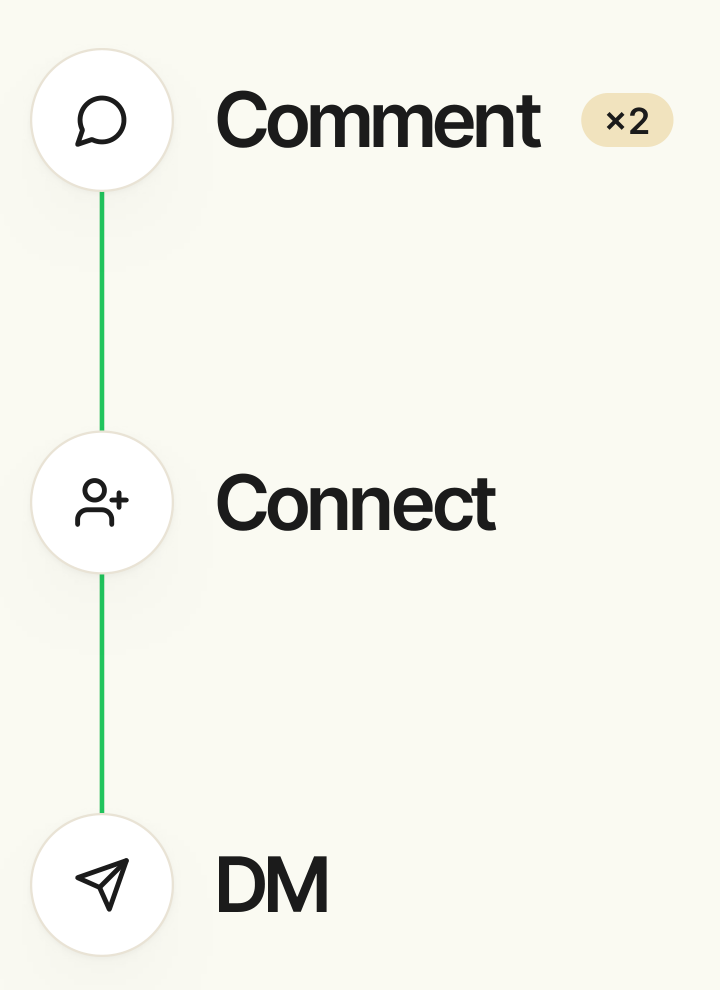
Give someone a chance to recognize your name before your connection request arrives. Oleg recommends starting with two comments on their posts, then connecting and sending the first DM.
In the campaign's outreach settings, enable the warm-up delay and set the required number of comments. Extrovert tracks progress for each prospect. Once they have received the comments, they become ready for outreach.
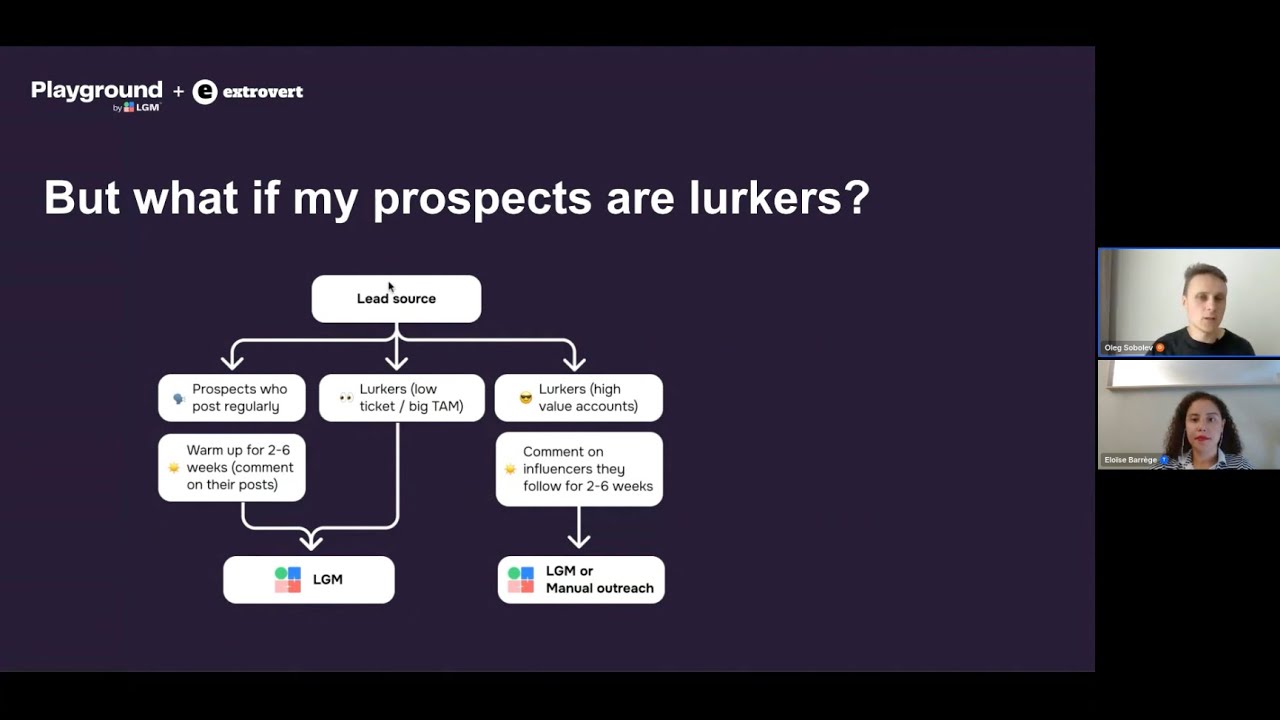
The time this takes follows the person's posting habits. Someone who posts often may be ready in a week; someone who posts occasionally may take a month. Use “finish warmup first” to prioritize prospects who need one more comment before they can move to outreach.
For people without recent posts, the campaign can go straight to outreach. Choose the approach when setting up the campaign so good-fit prospects don't sit waiting for a post.
For the first DM, Oleg's team often uses a question, observation, or joke. Give the person something easy to answer. After the reply, continue the conversation at a sensible pace while staying visible through comments and your own posts. There is no need to squeeze the pitch into the next message.
Give Claude a short daily queue
A useful daily request is the one Oleg uses: ask for today's follow-up opportunities, then ask for the top ten commenting opportunities.
Claude reads the conversations Extrovert has already prioritized. It does not need to work through your entire LinkedIn inbox to decide where to start. For each conversation, it can prepare a reply itself or ask Extrovert to draft one.
The comment feed needs priorities too. Give a campaign for people who have taken a demo more weight than a low-frequency nurture campaign. Within each campaign, choose the sorting that fits the work: finishing warm-up for active outreach, or spacing out touchpoints for long-term nurturing. Otherwise, prolific posters can take all your attention.
You have three ways to handle the suggestions:
- Review, edit, approve, or skip them yourself.
- Let selected commenting campaigns run within rules you have chosen.
- Have your agent review the queue, act on the cases you have authorized, and bring questions back to you.
Start by looking at the recommendations and drafts. When they consistently match your judgment, decide which work to delegate. You can make different choices for different campaigns.
The daily routine stays small: review the comment opportunities and clear the Recommended inbox. Improving the campaign priorities and Voice settings makes that routine easier to repeat.
Keep following up after the first reply
Someone can reply, have a useful exchange, and then disappear for a week. The conversation still needs attention.
Extrovert's Recommended inbox includes first DMs, follow-ups due under your campaign cadence, and opportunities to restart a conversation sooner. Each recommendation shows why the person is there.
Set the follow-up intervals according to the number of consecutive unanswered messages. Oleg's example is three days, then seven, then twenty. When someone replies, the cadence resets. If they go quiet again, the next draft uses the conversation so far.
Enable “follow up sooner after relevant post” to bring a conversation back into the queue when something happens. Conversation Restarters look for concrete developments: a conference, a new podcast, or a product launch. The recommendation includes the post and a draft, so you can see what prompted it.
Oleg's example is short: “How did the conference go?” You can ask about the event directly, without opening with “I saw your post…” or immediately attaching a sales offer.
Your own news can also help. A relevant feature release, resource, or upcoming event gives you something useful to share with a prospect whose conversation has stalled. Keep that material available to the assistant so you don't have to remember every possible follow-up yourself.
Give the drafts better material
Give Extrovert’s Voice library four kinds of information:
| Input | What to put there |
|---|---|
| Context | Who you are, what your company does, and what you know about the market. |
| Style | How you write. |
| Talking and selling points | The information and resources you can bring to a conversation. |
| DM playbook | How you start conversations and what you do after a reply. |
Use existing sales playbooks, PDFs, rep-training materials, and customer-call recordings to prepare it. Your assistant can help extract the relevant information. Check the result, especially the instructions for opening and following up.
Update the selling points when you release something new. A webinar, a resource, or a feature can become material for a future DM. The draft can then use the prospect's profile, your conversation history, and the current selling points to choose something you haven't already shared.
If you keep rewriting the same part of every draft, change the Voice or DM playbook. Fixing the instruction once saves you from correcting it in every conversation.
Separate active outreach from long-term nurturing
Some prospects deserve a focused outreach attempt. Others are worth staying in touch with for months.
For a broad market, set a limit on unanswered follow-ups and move on when you reach it. For a small market or a long sales cycle, Oleg uses what he calls “slow cooking”: occasional comments, less frequent DMs, and earlier contact when a relevant event happens. His example is a monthly comment and a quarterly DM.
Use separate campaigns when these strategies need different priorities, voices, commenting rules, or follow-up intervals. If the settings are the same and you only want to organize people into groups, use prospect lists inside one campaign.
You can bring in qualified people from other channels too. Oleg's team qualifies people from cold email, website visits, signups, and the CRM, then adds them to the appropriate Extrovert campaigns through API or MCP. The person managing daily outreach can then work from the same comment feed and Recommended inbox.
Campaign sharing lets you divide the work between operators, including separate people for comments and DMs. They work with enrolled prospects; they do not need to manage your whole LinkedIn inbox.
To try the workflow, choose one small list, set the warm-up and follow-up rules, and prepare a Voice from your existing sales material. Ask Claude for the first day's recommendations and review them before expanding to more campaigns.
Get the slide deck. Enter your work email on the replay page to receive the slides.
FAQ
Can I use ChatGPT instead of Claude?
Yes. Extrovert connects to assistants that support MCP, including Claude and ChatGPT. Connect the assistant you already use so it can work with your Extrovert campaigns and the other business context you give it.
Can I bring in conversations from before I connected Extrovert?
Yes. Add the relevant people to a campaign. Existing conversations with those prospects can appear in its inbox and provide context for follow-ups.
Can I send Lead Finder contacts to HubSpot?
You can use API or MCP access with an assistant connected to both systems. Extrovert did not have a native HubSpot connector as of October 2026.
How are Signals credits charged?
Credits are deducted for qualified prospects returned by the campaign, rather than every person analyzed. You can review usage and add credits from the credits page.
Do Lead Finder credits renew each month?
As of October 2026, each seat included 300 monthly credits. Included credits renew each month; purchased top-ups roll over.