On this page
Account executives need more than a first meeting. They need relationships with several people inside an account, a reason to reconnect when a deal goes quiet, and a way to stay visible through a long buying cycle.
Extrovert brings together posts from the people you track, comments in your voice, recommended DMs and follow-ups. You choose what to review or automate. For an AE, the useful starting point is a named-account campaign that includes the champion, other decision-makers and the people involved in renewal or expansion.
The six tools below cover different parts of that job: Extrovert for ongoing engagement, Sales Navigator for account research and relationship mapping, Champify for relationship intelligence in Salesforce, Taplio for publishing and engagement, Kondo for inbox follow-through, and Surfe for contact data and CRM sync. This is an account-executive toolkit, rather than a catalogue of tools for sending more first-touch messages. For the broader sales workflow, see LinkedIn tools for sales teams.
Choose the workflow you need first
For a narrow buying group, use account research and contact data to find the missing people, then nurture the named stakeholders. For a stalled deal, identify the unresolved commercial step and prepare a relevant private conversation. For renewal or expansion, maintain relationships beyond the champion and combine LinkedIn activity with customer-success data.
The comparison below shows which part of that work each tool covers. The scenario guide after the product sections turns those choices into an account routine.
Best LinkedIn tools for account executives: quick comparison
On a narrow screen, swipe the table to see prices and plan conditions.
| Tool | AE job | Entry price and billing unit | What to check |
|---|---|---|---|
| Extrovert | Keep named stakeholders warm; restart quiet conversations | $49/seat/month, monthly | One seat is one LinkedIn account; 250 tracked prospects and 300 monthly discovery Credits included |
| LinkedIn Sales Navigator | Find missing buyers and introduction paths | US$119.99/license/month, monthly Core | TeamLink needs Advanced or Advanced Plus; deeper CRM integration needs Advanced Plus |
| Champify | Follow champions and re-engage known accounts | From $2,000/platform/month, Core | Salesforce workflow; Insider AI is an add-on on Core |
| Taplio | Maintain a publishing calendar and engage lead lists | $39/month, monthly Starter | AI writing and commenting start on Growth; outreach is on Pro |
| Kondo | Organize active chats and return to follow-ups | $35/user/month, monthly Basic | CRM integration and Sales Navigator Inbox are on Business ($45/month) |
| Surfe | Add missing contacts and current data to CRM | €39/user/month, monthly Essential | Essential and Pro have different enrichment allowances; Free is available |
Compare the job and the billing unit before comparing the number. Champify is a team platform; the other entry prices are individual subscriptions. Buying another tool only helps if it closes a gap in account coverage, relationship follow-through or CRM data.
Trigify appeared in the previous version of this list. Its team announced the retirement of the standalone platform on 23 September 2026. Standard customer access, monitoring, integrations and API access end at 11:59pm BST on 22 October 2026; contractual exceptions have individually confirmed dates. The service and customer accounts will not continue inside HubSpot, so it is no longer an active shortlist entry.
1. Extrovert for keeping several stakeholders warm
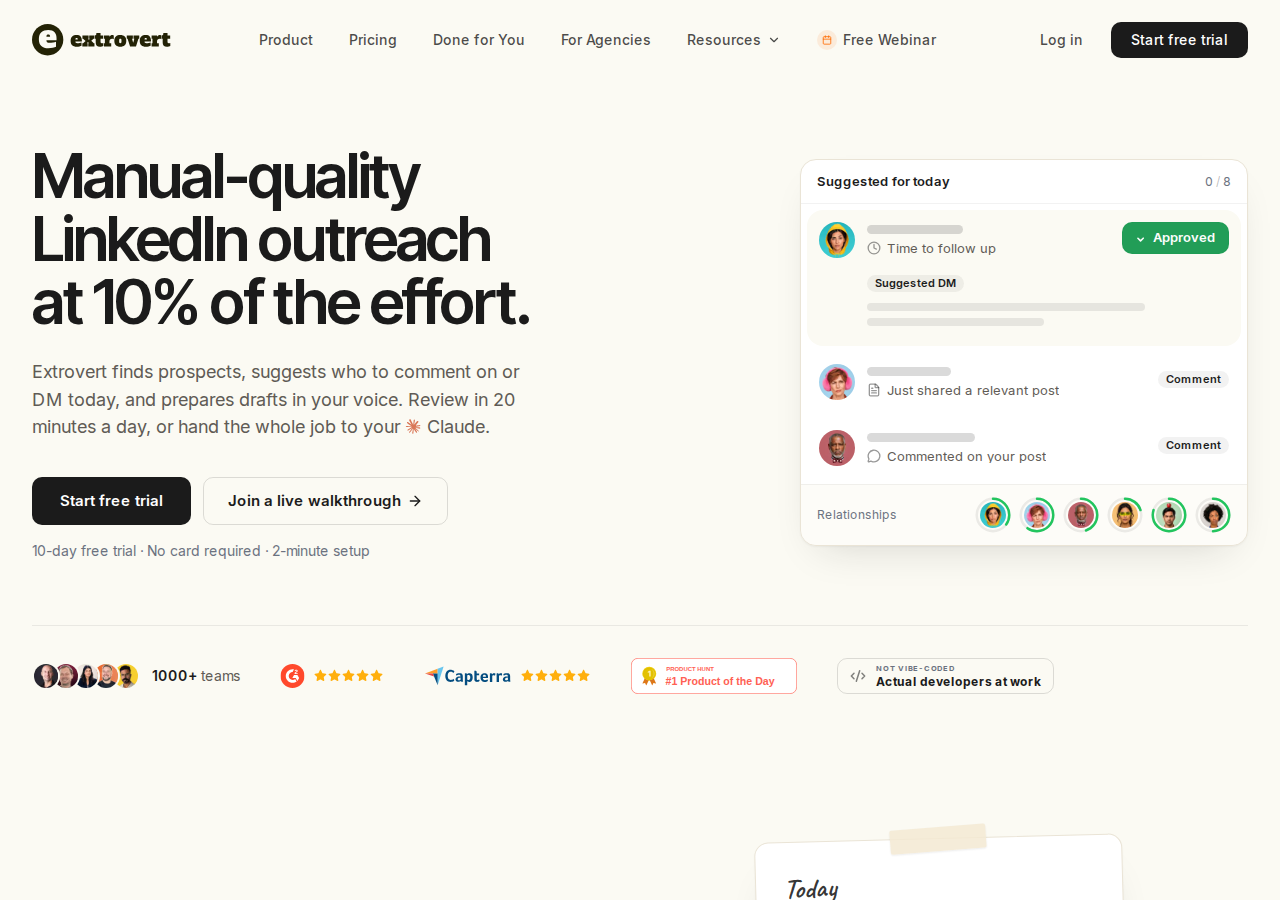
A buying-committee map tells you who matters. An AE still needs to keep in touch with those people between meetings, procurement steps and internal decisions. Extrovert's LinkedIn workflow brings their posts and your next conversations into a daily feed, with comments and DMs drafted in your voice.
Create a people campaign for the account, then add the relevant LinkedIn profiles. You can import people from a CSV, a Sales Navigator search, your CRM or your connections. Keep open-deal nurture separate from broader visibility campaigns so your writing style and priorities match the relationship.
Extrovert also finds new people. Lead Finder searches a third-party B2B database by role, seniority, company and location. Intent Signals finds people behind relevant LinkedIn activity, such as engagement with a chosen post or a competitor's content. Those discovery workflows can help identify additional contacts; they do not replace a native LinkedIn relationship graph or establish someone's role in a buying decision.
Know which conversation needs attention
With Recommended DMs, you see suggested conversations and a reason to contact each person. You can review whom to contact across the account instead of focusing on whoever last replied to an email. Review the context, adjust the draft and send it, or snooze a conversation that is not timely.
Illustration: the DM workspace on its Recommended tab, 5 conversations due for a message today, each with its reason. Connected 2 days ago: First DM. No reply for 9 days: Follow-up. New role at their company: Restarter signal. Promised a call 2 weeks ago: Follow-up. Quiet for 3 months: Keep in touch. The first one is open, with the first DM drafted and the buttons Send and Snooze.


Restart a quiet relationship with something relevant
Conversation Restarters suggests a DM based on a prospect's post. When a deal goes quiet, that post gives you a reason to reconnect beyond asking whether the buyer has an update.
Illustration: Extrovert reads the prospect's posts. hot take, thought leadership, motivation, promotion are skipped. One post, went to sf tech week, is a Restarter signal. Extrovert suggests the DM "Seen you went to SF Tech Week. How did it go?", and the prospect replies.

What an AE can do with Extrovert:
- Track the people in an open deal, a customer account or a renewal campaign.
- Prioritize posts and draft comments using your voice and playbook.
- Work through recommended DMs, follow-ups and conversation restarters.
- Review individual drafts, approve in bulk or automate a campaign.
- Let an assistant connected through MCP review, edit, approve or send within the permissions you allow.
- Share campaigns and prospect lists with teammates, including free review-only users.
The daily workflow is designed around about 15 minutes of attention. For high-value account relationships, choose review settings deliberately rather than assuming every action always requires manual approval. Daily limits, working hours and spaced actions are available; no software can guarantee immunity from LinkedIn restrictions.
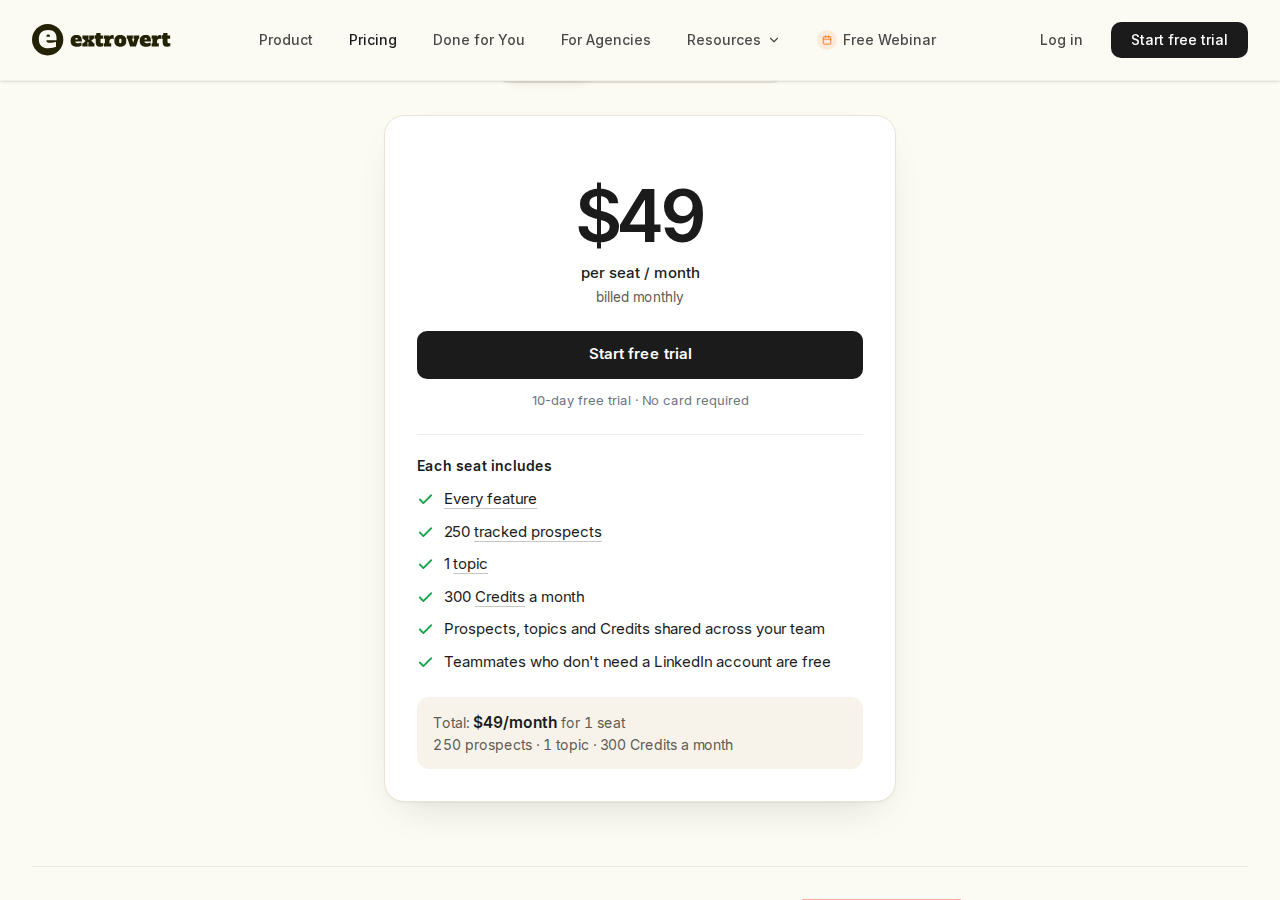
Pricing: a 10-day free trial with no card required. At one seat, the monthly plan is $49 per seat and includes every feature, 250 tracked prospects, one topic and 300 monthly Credits. Prospects, topics and Credits are pooled across the team. A seat represents one LinkedIn account; teammates who only review are free. Lead Finder costs one Credit per delivered prospect, while Intent Signals costs 25–250 Credits per delivered prospect, depending on the source. Adding a discovered person and paying for extra ongoing tracking are different costs. See Extrovert pricing for team and annual discounts.
Account planning: Extrovert helps you find, track and engage people. Confirm who belongs in the deal and keep stakeholder roles and commitments in your account plan. For the role-specific workflow, see LinkedIn for account executives.
2. LinkedIn Sales Navigator for account research and relationship mapping

Sales Navigator uses LinkedIn's professional network to search for buyers, save leads and accounts, and surface updates such as job changes and new content. Relationship Map supports collaborative org charts, key-lead alerts and visibility into buying-committee gaps. TeamLink identifies introduction paths through your team's connections.
It also supports messaging. All three plans list 50 monthly InMail credits for outreach beyond your network. Advanced and Advanced Plus offer AI message drafts in select languages, currently in public beta.
Relevant capabilities:
- More than 50 search filters for lead and account research.
- Saved-lead and account alerts, including job or role changes.
- Relationship Map and Relationship Explorer for account coverage.
- TeamLink on Advanced and Advanced Plus.
- Account IQ and Lead IQ for AI-assisted research, rather than a guaranteed lead score.
- CRM contact creation and deeper CRM integrations on Advanced Plus.
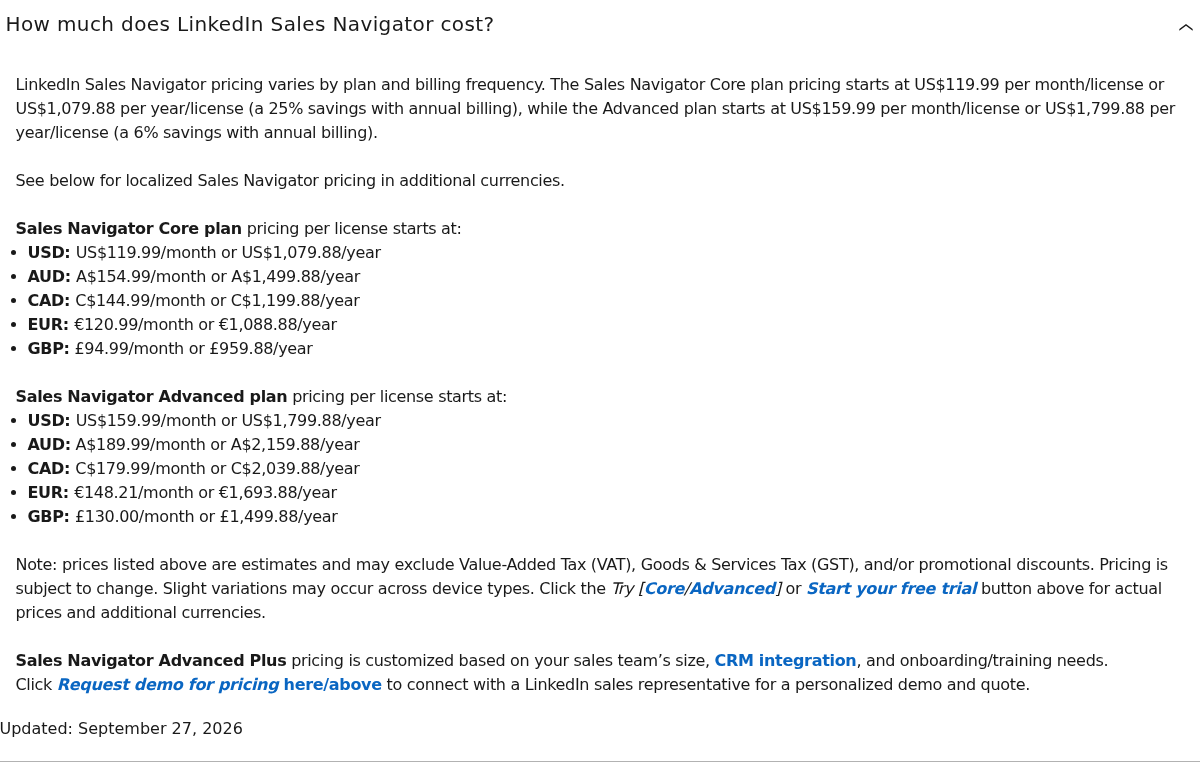
Pricing: US Core starts at $119.99 per license/month and Advanced at $159.99 per license/month, billed monthly. Annual prices are $1,079.88 per license for Core and $1,799.88 for Advanced. Advanced Plus is quoted for the team. Local prices, tax, device and promotions can change the checkout amount. Core and Advanced trial eligibility depends on region and subscription history, and payment information is required.
Boundary: account research, native InMail and LinkedIn relationship information are different from an ongoing comment-to-DM nurture campaign. Plan-specific access matters, especially for team introduction paths, AI features and CRM integration. Extrovert versus Sales Navigator explains where the workflows overlap and where they differ.
3. Champify for champion tracking and Salesforce relationship intelligence
Champify tracks known customers and champions as they move companies, then brings those relationships into the revenue team's workflow. For an AE, a move can affect an active deal, create a new account opportunity or change who should be involved in an expansion conversation.
Its Insider AI also uses call transcripts, email and CRM context to guide whom to re-engage, when and how. That includes closed-lost nurture, so the product's scope is broader than following former closed-won customers.
Relevant capabilities:
- Relationship Tracking for company changes among known contacts.
- A native Salesforce package with account matching, routing and relationship context.
- Slack and email alerts, plus sales-tool integrations.
- Insider AI account-level nurture insights, with inclusion or add-on access depending on the plan.
- Calendar Sync and CRM Clean according to the plan and add-ons.
Champify says past-customer signals convert 6–22 times higher than other outbound signals.
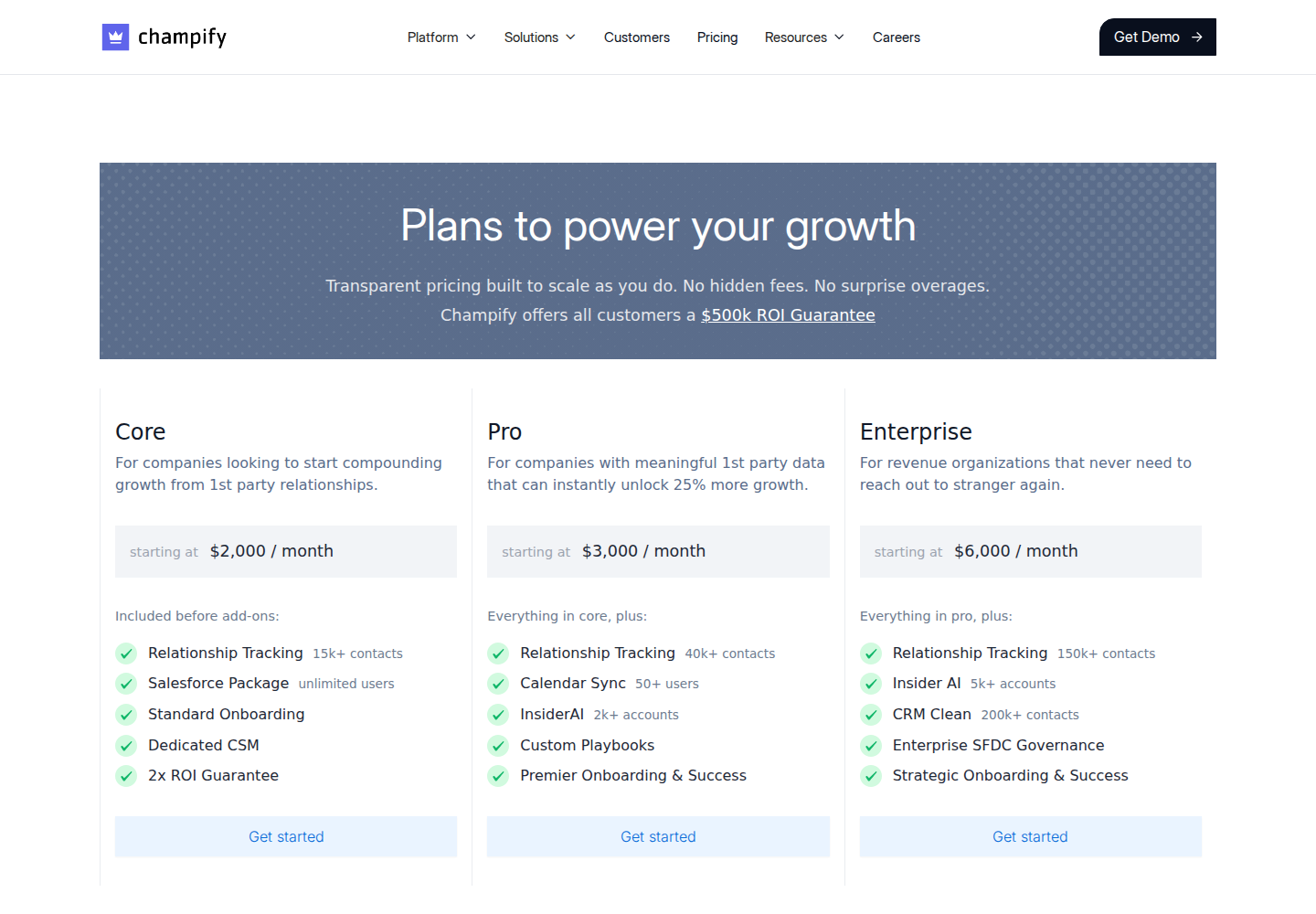
Pricing: the published Core plan starts at $2,000/month before add-ons and includes Relationship Tracking for 15,000+ contacts and a Salesforce package with unlimited users. Pro starts at $3,000/month; Enterprise starts at $6,000/month. Pricing scales with monitored contact/account volumes, calendar users and services. These are platform prices, not directly comparable to one $49 Extrovert seat.
Boundary: Champify does not have a native HubSpot CRM integration. Its pricing FAQ describes syncing data to HubSpot through Salesforce when both are in use. The relationship-tracking product needs a meaningful contact base, while Insider AI is account-based. Job-change intelligence still needs an appropriate message and follow-through from the account team.
4. Taplio for publishing and LinkedIn engagement
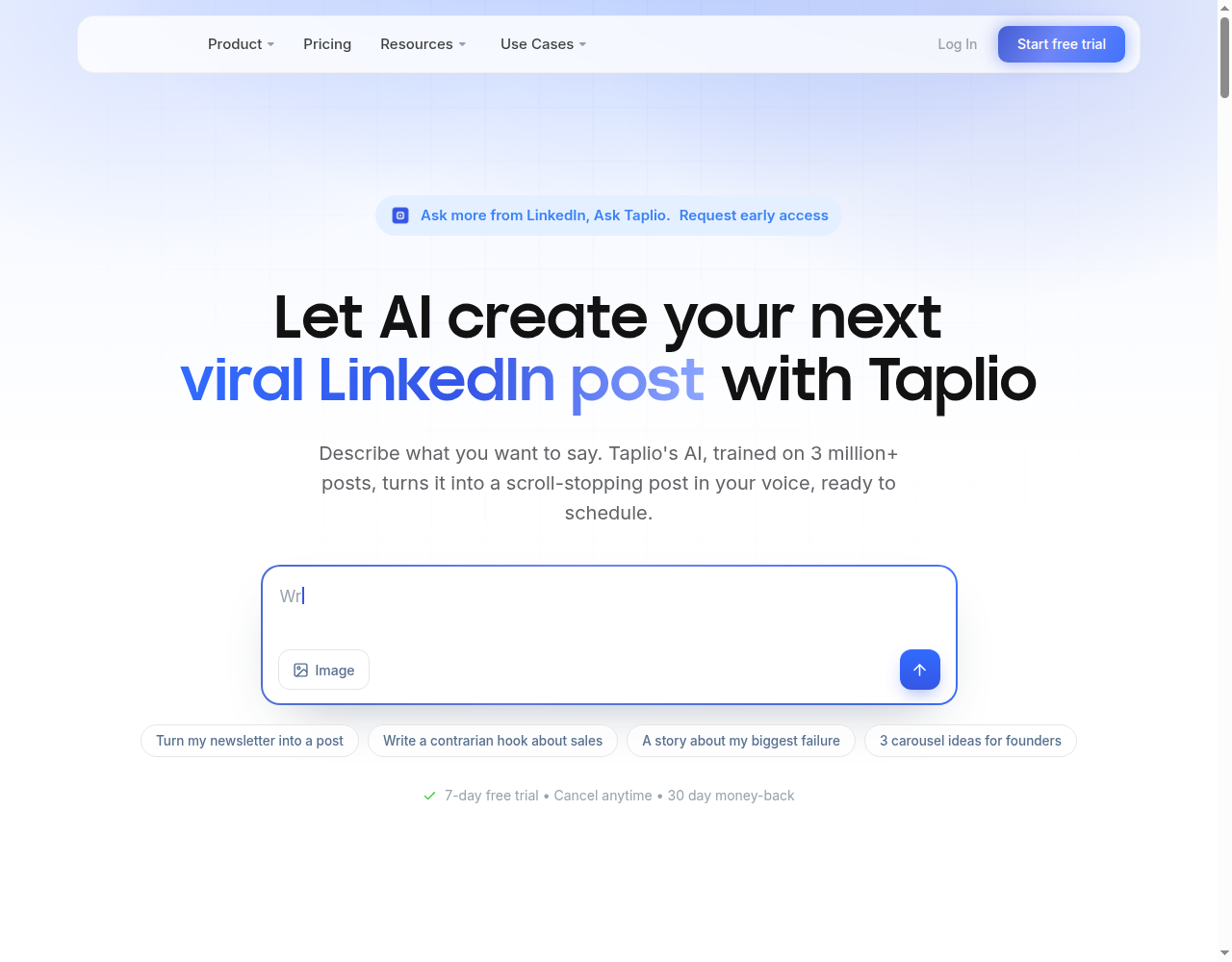
Taplio combines post planning, scheduling and analytics with engagement features. An AE building visibility with a broader audience can use its publishing calendar to plan and schedule posts. Taplio also includes contact lists and commenting on leads' posts.
Relevant capabilities:
- A post calendar, scheduling and analytics.
- AI writing on Growth and Pro.
- AI replies and commenting, with plan-specific credits.
- Contact lists and engagement with lead-list posts.
- Outreach automation on Pro, including DM and connection-request workflows.
- API and MCP connectivity.
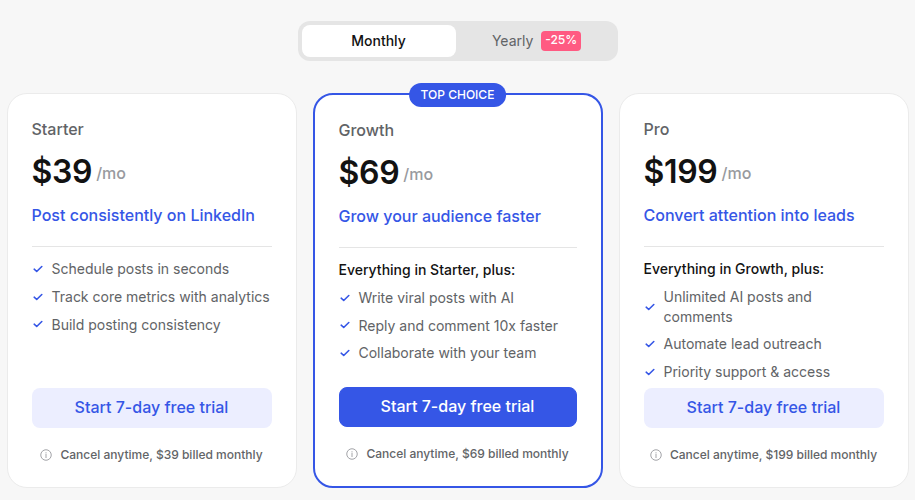
Pricing: the monthly plan cards list Starter at $39, Growth at $69 and Pro at $199 per month. Starter covers scheduling and core analytics; Growth adds AI writing and commenting, while Pro adds unlimited AI posts/comments and lead outreach. The seven-day trial gives Pro access before moving to the selected plan. Annual billing and multi-seat arrangements have separate discounts.
Boundary: a publishing schedule and lead list do not establish stakeholder ownership or deal stage. Taplio and Extrovert both support engagement. Extrovert's AE workflow centers on named-account nurture, recommended conversations and follow-up. See Taplio alternatives for the engagement-focused comparison.
5. Kondo for keeping LinkedIn follow-ups from slipping
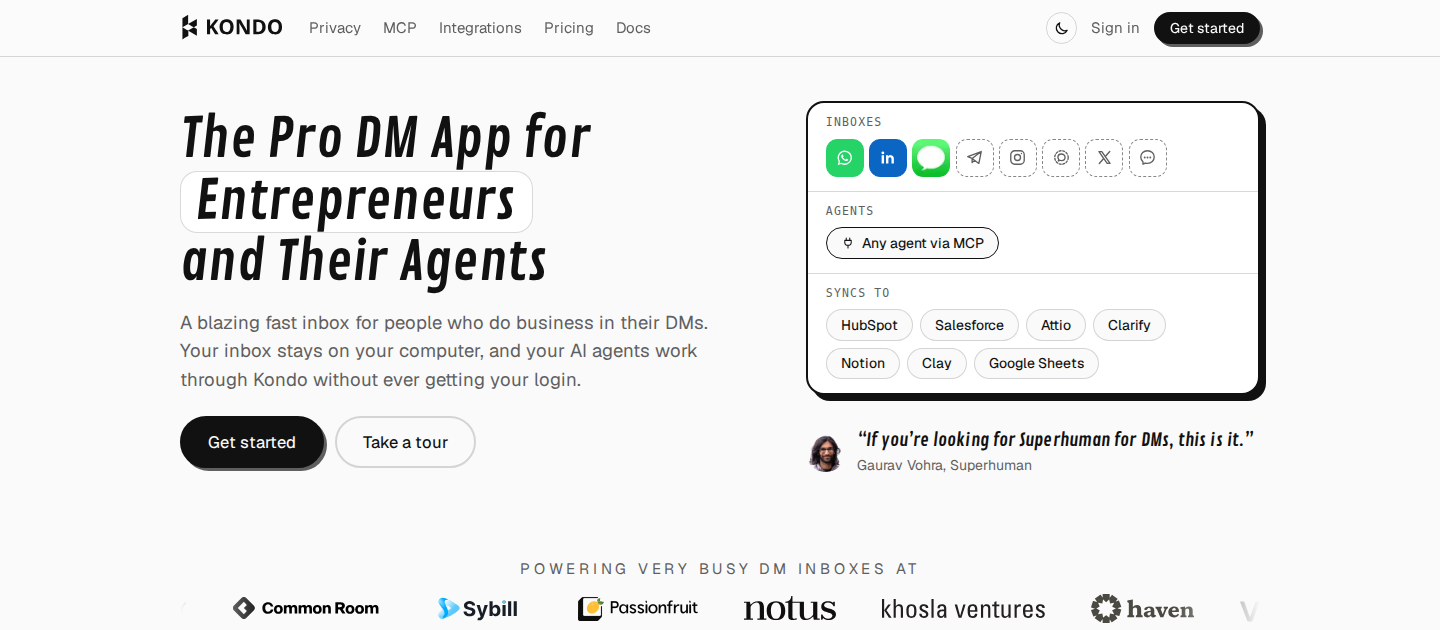
Kondo organizes existing LinkedIn conversations with labels, split inboxes, reminders and notes. For an AE working several open deals, the useful distinction is between a conversation waiting on the buyer and one where you owe the next step. A label keeps the account visible; a reminder brings the thread back when action is due.
Its Business plan adds Sales Navigator Inbox and CRM integrations. You can choose which conversations to sync, rather than copying every personal LinkedIn chat into the company CRM. Notes and snippets help retain context and avoid retyping routine details. Review each message against the actual account conversation before sending it.
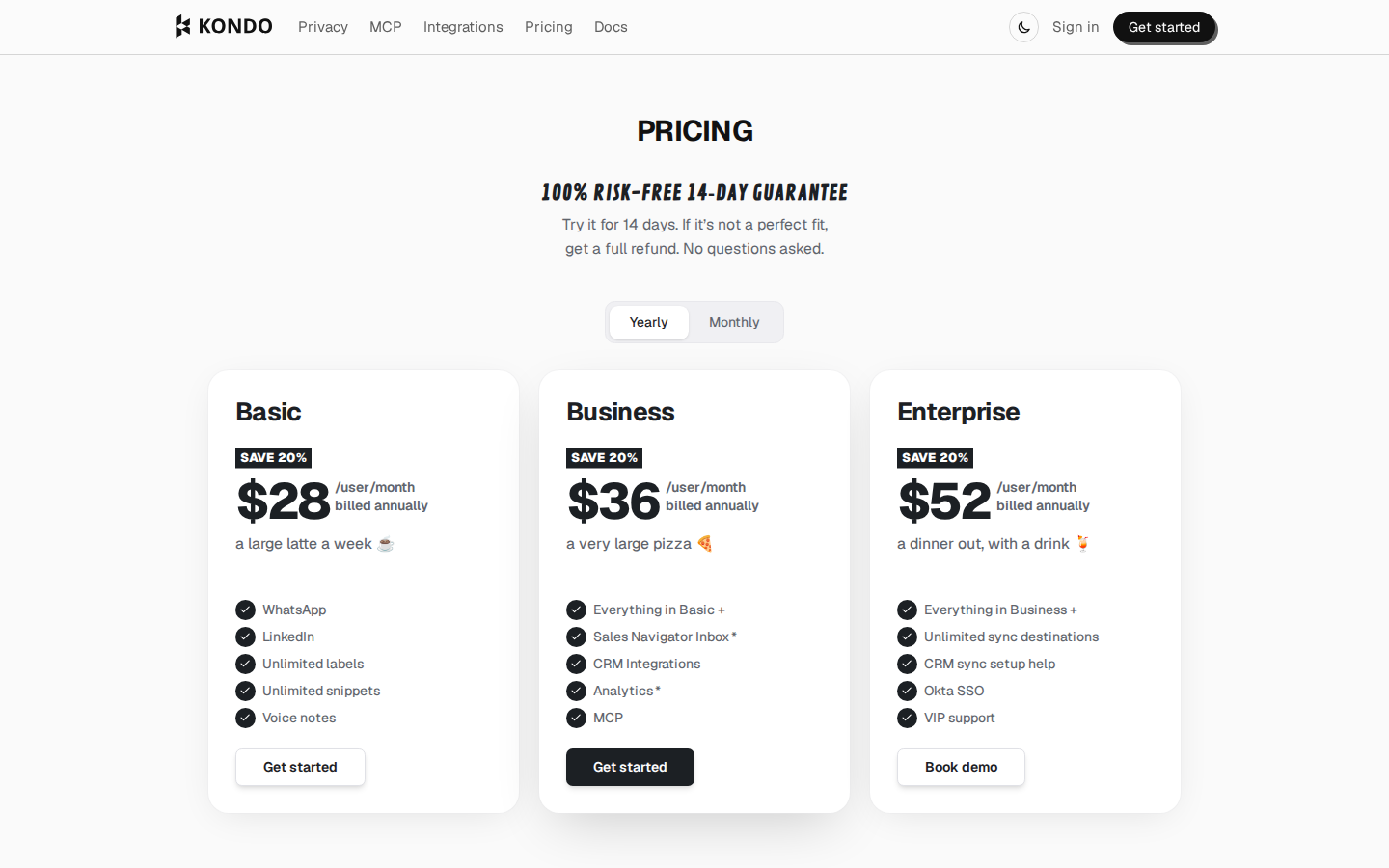
Pricing: Basic is $35 per user/month on monthly billing, Business $45 and Enterprise $65. Annual billing lowers those monthly equivalents to $28, $36 and $52 respectively. The offer is a 14-day money-back guarantee. CRM integrations and Sales Navigator Inbox belong to Business and above.
AE fit: inbox ownership and timely follow-through on an active deal or renewal. Labels and reminders help manage conversations; they do not discover missing stakeholders or show whether a customer is using your product successfully.
6. Surfe for filling contact gaps without losing CRM context
Surfe connects LinkedIn research to your CRM through a browser extension. It finds email addresses and mobile numbers, creates contacts and deals, and syncs data with Salesforce, HubSpot, Pipedrive or Copper. An AE can research a missing stakeholder on LinkedIn and add the contact to the account record without a separate copy-and-paste exercise.
That matters when an account plan contains a champion but no route to another affected team. Contact discovery and enrichment give you a way to reach the person; the next conversation establishes their role in the buying group. Surfe's account-executive workflow also covers contact changes and growth signals for existing accounts. Keep renewal dates, customer health and expansion commitments in the systems that own them.
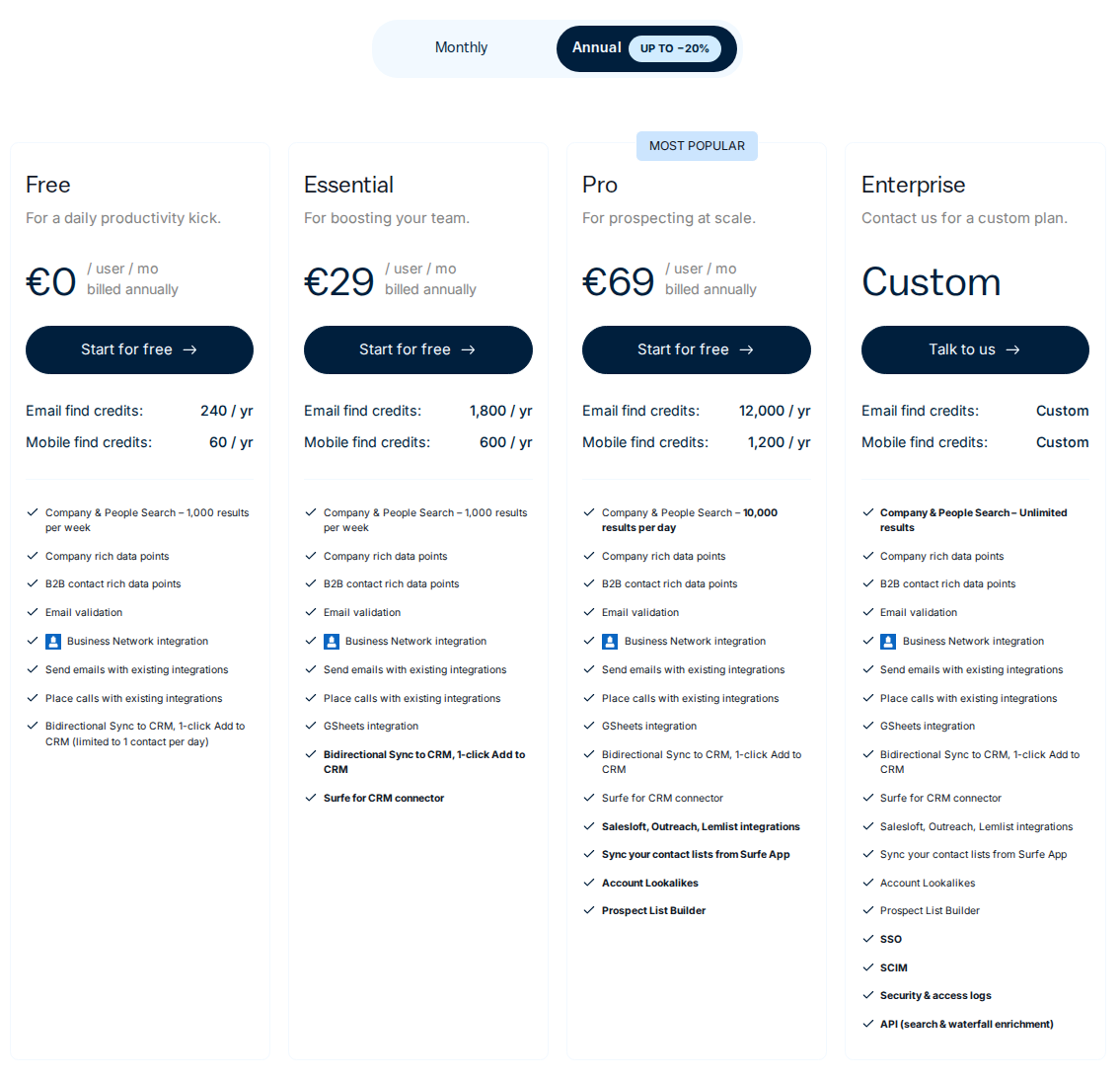
Pricing: the euro plans shown below list Essential at €39 per user/month and Pro at €79 on monthly billing. With annual billing, the monthly equivalents are €29 and €69. Free and custom Enterprise plans are also available. On monthly billing, Essential includes 150 email and 50 mobile credits per month; Pro includes 1,000 email and 100 mobile credits. The annual cards show yearly allowances of 1,800 emails and 600 mobiles for Essential, or 12,000 emails and 1,200 mobiles for Pro. Published regional prices may use another currency.
AE fit: missing contact data and CRM hygiene around a buying group. Pro adds prospect-list tools and more enrichment capacity. Buying a larger allowance is useful when missing contact data is the bottleneck; it does not establish an account's purchasing authority or renewal intent.
Choose by the gap in your account plan
The buying group is too narrow
Identify the roles still missing from the deal: economic approval, technical evaluation, procurement or the team that will use the product. Sales Navigator supplies LinkedIn account research and relationship information. Extrovert's Lead Finder can find additional people by role and company; Surfe connects contact research and enrichment to the CRM. Confirm responsibilities in conversations, then include the relevant profiles in a named-account nurture campaign.
Track coverage as relationships with named people and confirmed responsibilities. A list of job titles is not evidence that the account has agreed to buy.
A deal has stalled
First determine what is unresolved: timing, budget, a decision-maker, evaluation or an agreed next step. A public post may give you a relevant reason to reconnect, but it does not reveal a private procurement decision. Extrovert's Conversation Restarters and Recommended DMs help prepare the conversation; Kondo reminders help return to a thread you already own. Champify's Insider AI adds re-engagement context from account history for teams using its Salesforce workflow.
Keep the message tied to the relationship and follow through privately on the commercial question. More comments will not resolve an unanswered security review.
Renewal or expansion depends on more than your champion
Keep the current sponsor, operational owner and other affected teams in the account plan. Use LinkedIn to maintain those relationships between formal reviews. A champion moving companies deserves an account reassessment; Champify tracks known relationships, while Sales Navigator surfaces saved-lead changes. Surfe can help refresh contact records, and Extrovert supports ongoing stakeholder engagement.
Renewal decisions also need product adoption, contract dates and customer-success context. An active LinkedIn contact is not a customer-health score. Judge the routine by confirmed stakeholder coverage, useful replies and agreed next steps, alongside the customer data your team already uses.
Build a named-account LinkedIn routine
Start with the account plan rather than a shopping list. Keep stakeholder roles and next steps in your CRM, then use Extrovert to maintain the relationships around that plan.
- Define account coverage. Identify the champion, economic buyer, affected teams and any missing relationships. Confirm roles through account research and conversations; a job title alone does not prove purchasing authority.
- Create a people campaign. Add the relevant profiles to Extrovert and set the voice, campaign goal and review settings. Separate renewal and expansion nurture from first-touch prospecting.
- Review relevant posts and conversations. Comment where you have something useful to add. Work through Recommended DMs and follow-ups with the account context in mind.
- Act on changes. Treat a job-change alert as a reason to reassess the account, not proof that the opportunity is lost. Update the stakeholder plan and decide whether a new conversation is warranted.
- Track account progress. Look for replies, meetings, new stakeholder relationships and agreed next steps. Impressions and comment counts are visibility measures, not closed revenue.
Public LinkedIn engagement is only part of an AE's work. Keep commercial commitments, confidential deal details and procurement steps in the appropriate private channels. Extrovert's trial gives you ten days to set up the named-account routine on your own LinkedIn account.
FAQ
What LinkedIn tools do account executives need?
The useful jobs are account research, relationship tracking and ongoing engagement. Extrovert covers daily comments, DMs and nurture; Sales Navigator covers native LinkedIn research, relationship features and InMail; Champify adds Salesforce relationship intelligence; Taplio covers publishing and engagement; Kondo organizes conversations; Surfe connects contact data to CRM. You do not need every tool to start a named-account campaign.
Can Extrovert find additional stakeholders?
Lead Finder can find people matching a role and company, and Intent Signals can find people behind relevant LinkedIn activity. You decide whether those people belong in the buying committee. Neither a database match nor an engagement signal proves they own the purchase decision.
Does Sales Navigator replace Extrovert?
Sales Navigator has InMail, alerts and AI message drafts on eligible plans. Extrovert focuses on ongoing comments, recommended DMs, follow-ups and nurture campaigns. It is not a native InMail or relationship-map replacement.
What happened to Trigify?
Trigify is retiring its standalone platform as its team joins HubSpot. Standard access ends at 11:59pm BST on 22 October 2026, including integrations, API access and monitoring. Customers with different contractual terms have individually confirmed dates. Accounts will not migrate to HubSpot.
How much does a LinkedIn toolkit cost for one AE?
Extrovert starts at $49 per month for one seat on monthly billing. Sales Navigator Core starts at US$119.99 per license/month; adding it is a separate subscription. Extra tracked prospects, discovery Credits and other platform subscriptions can add costs. Champify's team-platform prices should not be treated as a per-rep fee.